

Powered By ZebraWeb

Smarter Assigning for Modern Officiating

ZebraWeb is the assignor’s command center—automating your entire assignment process while giving you unmatched flexibility and control. Designed for modern officiating, it adapts to your policies, preferences, and workflow. Our system delivers speed, fairness, and precision, no matter how complex your schedule or assignment needs.  If you’re still assigning from a spreadsheet and confirming officials by phone, you already know how fast one change can unravel a whole schedule.

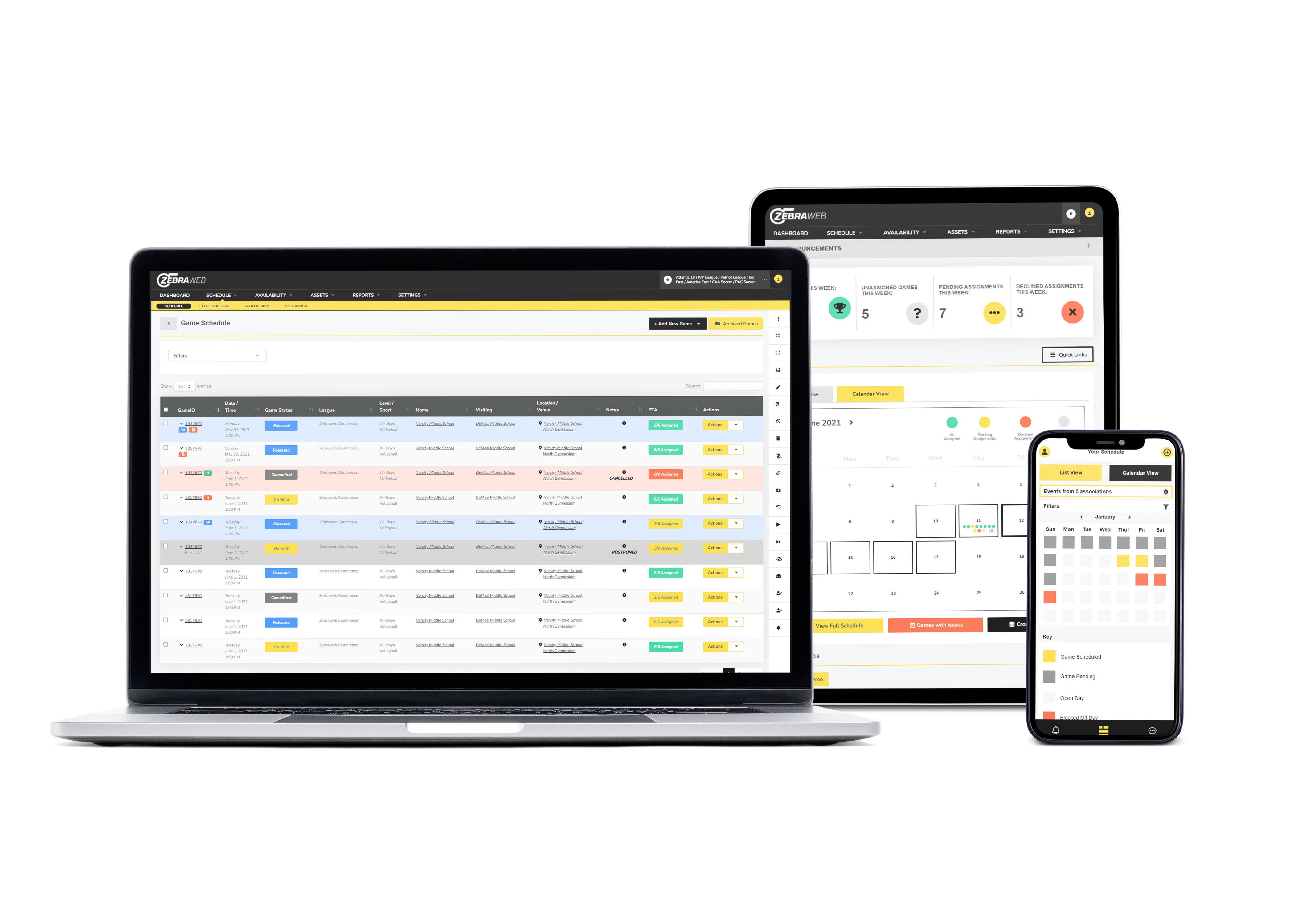
ZebraWeb software interface displayed on a laptop, tablet, and smartphone showing scheduling features

Why ZebraWeb?

Assign Smarter, Not Harder

ZebraWeb equips assignors with a powerful, flexible system designed to streamline every part of the assignment process. Whether you’re assigning manually, in bulk, or using intelligent automation, ZebraWeb adapts to your needs—with rules and configurations you control. It’s built to ensure every assignment is accurate, conflict-free, and fair without sacrificing flexibility.  When assignments live in one person’s head or a spreadsheet, fairness is hard to prove and easy to get wrong. ZebraWeb applies the same rules to every game, so distribution holds up whether anyone’s watching or not.

Football referee in striped shirt and white pants signaling on a green field with players.
White check mark icon indicating a completed feature or benefit outline

Customize assignment logic based on rank & availability

White check mark icon indicating a completed feature or benefit outline

Prevent duplicate or back-to-back assignments

White check mark icon indicating a completed feature or benefit outline

Balance assignment workloads with fair, transparent logic

White check mark icon indicating a completed feature or benefit outline

Avoid conflicts, school restrictions, and travel issues

Blue checkmark icon indicating completed tasks or verified athletic event information

View assignment trends in real-time dashboards

White check mark icon indicating a completed feature or benefit outline

Confirm eligibility and qualifications before assigning

Why ZebraWeb?

Take Control of Game Day

ZebraWeb centralizes every moving part of game-day management—so when things change (and they always do), you’re ready. From last-minute reassignments to tournament reschedules, ZebraWeb keeps your entire team informed and in sync in real time.  A Friday-night reschedule shouldn’t mean forty text messages. One update in ZebraWeb reaches every official, coach, and staffer at once — before anyone shows up to the wrong field.

Blue check mark icon indicating a feature or completed task

Centralized assignment and schedule dashboard

Blue check mark icon indicating a feature or completed task

Real-time alerts via text, email, or app push notifications

Blue check mark icon indicating a feature or completed task

Full visibility into confirmations and changes

Blue check mark icon indicating a feature or completed task

Built-in conflict detection and resolution

Blue check mark icon indicating a feature or completed task

Live access for assignors, team staff, and officials

Blue check mark icon indicating a feature or completed task

Reschedule games with one-click updates

Basketball on a polished court with a referee in the background, illustrating sports assignment software.

Technology That Works For You

Seamless Communication Across All Stakeholders

ZebraWeb ensures assignors, officials, schools, and staff are always on the same page. With real-time notifications, shared event data, and built-in messaging tools, the platform keeps everyone informed and aligned—before, during, and after game day.  A missed message is a missing official. Keeping everyone on the same real-time record is what turns “I never got the change” into a problem you don’t have anymore.

Female soccer coach holding a ball and talking to her team in a huddle
White check mark icon indicating a completed feature or benefit outline

Instantly notify officials of schedule changes

White check mark icon indicating a completed feature or benefit outline

Enable direct messaging between staff and assignors

White check mark icon indicating a completed feature or benefit outline

Approve assignments on the app, desktop of by email.

White check mark icon indicating a completed feature or benefit outline

Share event details across teams and locations

White check mark icon indicating a completed feature or benefit outline

Promote clear, consistent updates across your network

White check mark icon indicating a completed feature or benefit outline

Reduce miscommunication and last-minute confusion

Technology That Works For You

Let Your Data Guide Every Assignment

ZebraWeb doesn’t just schedule games—it captures the trends, performance, and patterns behind every assignment. With real-time insights and historical data at your fingertips, you can make more accurate, fair, and strategic decisions every step of the way.  When an official asks why they’re getting fewer games — or a league asks whether assignments are fair — the answer is in the data, not a debate. Distribution reports turn a subjective conversation into a clear one.

Simple blue check mark icon indicating a completed or verified task

Monitor performance trends and event metrics

Blue check mark icon indicating a feature or completed task

Improve fairness with assignment distribution reports

Blue check mark icon indicating a feature or completed task

Surface underused or overassigned officials instantly

Blue check mark icon indicating a feature or completed task

Identify recurring scheduling challenges early

Blue check mark icon indicating a feature or completed task

Track official workloads and availability history

Blue check mark icon indicating a feature or completed task

Export clean, detailed data for league or school use

Three football referees in striped shirts and white pants stand on a field with a football.

Features that make assigning easier

Everything an assignor needs to schedule officials, prevent conflicts, and stay in control — in one platform.

Icon representing assignment automation with a calendar, gear, and checkmark for sports officiating management

Assignment Automation

Assign faster using rules, availability, ranks, and configurable logic.

Icon illustrating conflict detection with two overlapping calendar events and a warning symbol

Conflict Detection

Prevent duplicate assignments and scheduling conflicts before they happen.

Icon representing official availability with a calendar and a checkmark for sports officiating management

Official Availability

Track availability, qualifications, preferences, and history in one place.

Illustration of a smartphone with notification icons representing instant communication and real-time alerts

Real-Time Communication

Send updates and alerts by app, email, or text instantly.

Vector illustration of a sports official managing game

Game-Day Management

Handle changes, cancellations, and reassignments with ease.

Icon showing a bar chart and a magnifying glass representing reporting and insights software features

Reporting & Insights

Access dashboards, trends, and exportable reports for better decisions.

How Can We Help?

Every season you spend assigning by hand is time lost to conflicts, phone calls, and last-minute scrambles. See how much ZebraWeb takes off your plate in a short web meeting.

ZebraWeb Officials Assigning FAQ

How assignors automate assignments, manage game-day changes, and keep officials, schools, and staff in sync.

ZebraWeb is VantageSportz’s assigning platform for officials — the assignor’s command center. It automates the assignment process while giving assignors control over the rules and configurations, so officials get assigned to games accurately, fairly, and without conflicts, whether you’re assigning one game or an entire season.

ZebraWeb assigns officials using configurable logic based on rank, availability, and qualifications, and lets you assign manually, in bulk, or through intelligent automation. It prevents duplicate or back-to-back assignments, balances workloads with transparent logic, and confirms eligibility before an official is assigned — so the rules you set are applied to every game.

ZebraWeb centralizes assignments and schedules in one dashboard and pushes real-time alerts by text, email, or app when things change. Reassignments and reschedules happen with one-click updates, and assignors, team staff, and officials all have live access — so a last-minute change keeps everyone in sync instead of triggering a round of phone calls.


Yes. ZebraWeb keeps assignors, officials, schools, and staff aligned with real-time notifications, shared event data, and built-in messaging. Officials can approve assignments by app, desktop, or email, and schedule changes reach them instantly — which cuts the miscommunication and last-minute confusion that comes from managing officials across email and spreadsheets.

Yes. ZebraWeb has built-in conflict detection that flags duplicate assignments, school restrictions, and travel problems before they happen. It checks these automatically as assignments are made, so conflicts are caught at the point of assigning rather than discovered on game day.

ZebraWeb captures the trends and patterns behind every assignment, with real-time dashboards and historical data. Assignors can monitor performance and workload trends, surface underused or overassigned officials, track availability history, and export clean data for league or school use — turning assignment records into decisions that keep distribution fair.

ZebraWeb is built for assignors and officiating organizations managing modern officiating — from independent assignors to leagues, schools, and associations coordinating officials across many games and locations. It scales from simple schedules to complex, multi-team assignment needs while keeping the assignor in control of the rules.